Automatic roles
Automatically give or remove Discord roles based on a member’s Tibia characters and guilds on this server’s tracked world.
Requirements
- Bot permission: Manage Roles
- Your permission: Manage Roles
- Role positions: both you and the bot must be above the target role. Rules for higher roles are ignored.
How it works
- You add rules that describe who should get a role.
- NabBot evaluates members when certain triggers happen.
- If any one of a member’s registered characters matches any rule for a role, the role is added.
If the member no longer matches any rule for that role, the role is removed.
Commands
See the Roles commands.
Rule syntax
Rules apply only to characters on this Discord server’s tracked world.
| Syntax | Matches |
|---|---|
* |
Any user with at least one registered character on the tracked world |
*@GuildName |
Any user with a registered character in GuildName |
GuildName |
Shorthand; stored as *@GuildName |
Rank@GuildName |
Any user with a registered character in GuildName with rank Rank |
Notes:
- Matching is case-insensitive.
- Guild names are normalized when you add the rule.
- Multiple spaces are tolerated; fancy Unicode isn’t.
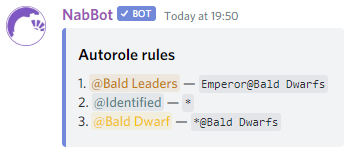
*→ give to all identified users on the world*@Redd Alliance→ all members of Redd AllianceEmperor@Bald Dwarfs→ only rank Emperor in Bald Dwarfs
Add rules
Use /autorole add with two parameters: a role and a rule.
Samples
-
/autorole add @Redd Alliance Redd Alliance
Members of Redd Alliance receive@Redd Alliance. -
/autorole add "Bald Dwarfs Vice" Emperor@Bald Dwarfs
Rank Emperor in Bald Dwarfs receive@Bald Dwarfs Vice. -
/autorole add Identified *
Any user with a registered character on the tracked world receives@Identified.
You can add multiple rules to the same role. Typical use: one @Allies role with a rule per allied guild.
List rules with /autorole list.
When roles update
NabBot enforces rules on these triggers:
- A new member joins and already has registered characters
- A member uses
/imto register characters - A member uses
/imnotto unregister characters - A character is checked with
/whoisand a guild/rank change is detected - The live tracker sees a character online and detects a change
Timing
- When a character is online, checks happen within minutes.
- Offline characters are checked on demand via commands.
- Role updates are subject to Discord rate limits on large servers.
Bulk re-evaluation
Use /autorole refresh to re-evaluate all members against your current
rules.
No exemptions
Refresh ignores manual changes and reapplies roles according to rules. There’s no suppression or per-user exemption.
Limitations
- Removing a rule does not immediately remove roles. Members lose a role only after re-evaluation and when they match no remaining rule for that role.
- Inactive characters that haven’t been online in a while won’t trigger changes on their own. Use
/whoisor Refresh. - Manual role changes may be reverted on the next evaluation if rules disagree.
- Multi-world setups are not supported. Rules only consider this server’s tracked world.
Suggested uses
- Grant access to private channels for your guild and allies
- Mark identified users who have at least one registered character on the world
- Separate guild ranks into different channels or permissions
- Auto-tag multiple ally guilds into a single role