Groups
Groups are opt-in roles members can join or leave on their own using:
Requirements
- Bot permission: Manage Roles
- Your permission (to create/delete groups): Manage Roles
- Role positions: both you and the bot must be above the role you’re turning into a group.
Creating groups
There are two ways:
- Convert an existing role into a group:
/group-manage set - Create a new role as a group:
/group-manage create
Once a role is marked as a group, you can rename it freely. The group link remains intact.
Note
You can only create or manage groups for roles at or below your highest role.
The bot also must be above those roles to assign/unassign them.
Deleting groups
Use /group-manage delete.
You can either:
- Unmark the role as a group (role stays; members can’t self-join/leave anymore), or
- Delete the role entirely.
Joining and leaving groups
Members use:
/group join— add the role to yourself/group leave— remove the role from yourself
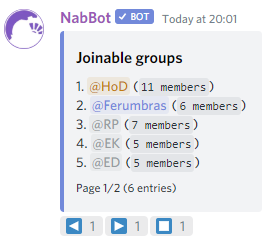
See all available groups with /group list:
Naming helps
Use clear, searchable names. Members will type the group name when joining/leaving.
Troubleshooting
Common causes
- Role too high: The target role is above you or the bot. Lower it in the role list.
- Missing permission: You or the bot lack Manage Roles.
- Renamed but not visible: The role still exists, but it’s no longer marked as a group. Re-run Set.
Suggested uses
- Vocation groups so members can show their main
- Language or nationality groups for social channels
- Quest/boss interest groups to organize parties or access gated channels
- Opt-in notification groups (ping lists), e.g.
@Contests